Declarative vs Imperative
By default, a Flet app follows an imperative approach: you directly change control properties like visible and value, add or remove controls, and Flet pushes the change to the page for you. That's fine for small apps, but it doesn't scale well — as a screen grows, the logic for keeping related controls in sync gets duplicated across event handlers, and it's easy to miss one and end up with an inconsistent UI.
Flet also supports a declarative approach: the state of your app is the single source of truth, and the UI is derived from it. You don't change controls or their properties directly; instead, only change application state, by assigning to an observable field or calling a hook's setter. Flet components detect the change and re-render UI that depends on it.
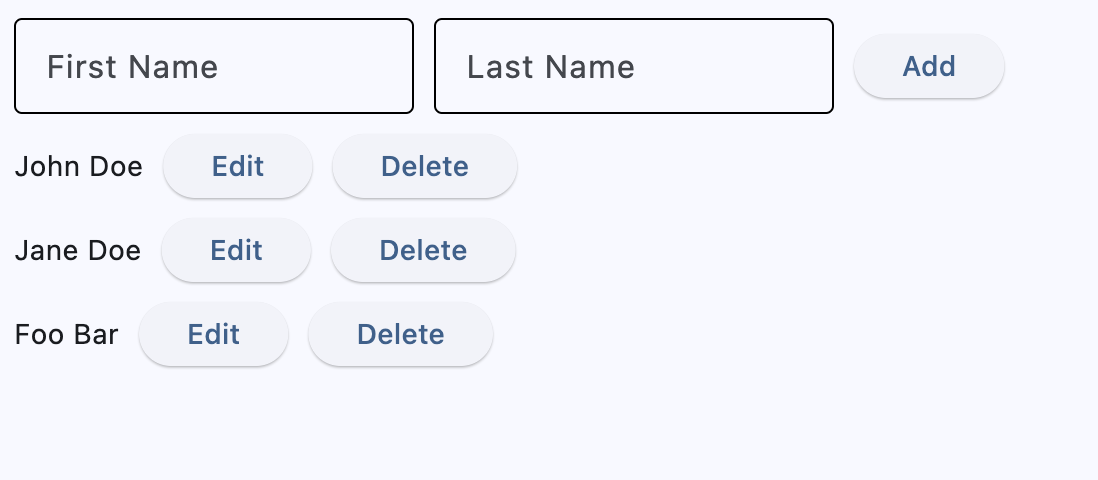
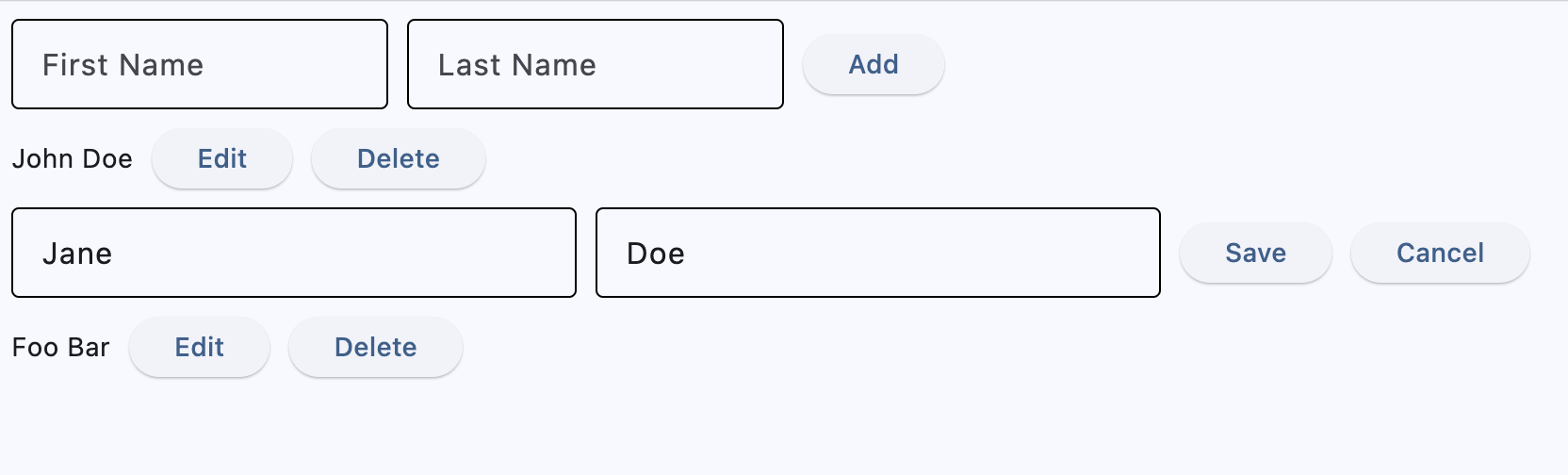
This article shows the same simple "User Manager" app built both ways — imperative and declarative — so you can compare the two approaches directly. It's a classic CRUD app: list users, add a new user, edit inline, and delete:
Imperative
In this example, clicking a button changes control properties directly (visible, value) and adds or removes controls from the page's control list — that's what makes it imperative. Flet pushes each change to the page automatically.
- Add creates a new
Itemrow from thefirst_name/last_nameTextFieldvalues, appends it topage.controls, and clears both fields. - Edit resets the
TextFields to the row'sfirst_name/last_name, setsvisible=Falseontext,edit_button, anddelete_button, andvisible=Trueonedit_text,save_button, andcancel_button— switching the row into edit mode. - Save copies the two
TextFieldvalues intofirst_name/last_nameandtext.value, then setsvisible=Trueontext,edit_button, anddelete_button, andvisible=Falseonedit_text,save_button, andcancel_button— returning to read-only mode with the new values. - Cancel sets
visible=Trueontext,edit_button, anddelete_button, andvisible=Falseonedit_text,save_button, andcancel_button— returning to read-only mode without saving. - Delete removes the row's
Iteminstance frompage.controls.
import flet as ft


class Item(ft.Row):
    def __init__(self, first_name, last_name):
        super().__init__()

        self.first_name = first_name
        self.last_name = last_name

        self.first_name_field = ft.TextField(first_name)
        self.last_name_field = ft.TextField(last_name)
        self.text = ft.Text(f"{first_name} {last_name}")
        self.edit_text = ft.Row(
            [
                self.first_name_field,
                self.last_name_field,
            ],
            visible=False,
        )
        self.edit_button = ft.Button("Edit", on_click=self.edit_item)
        self.delete_button = ft.Button("Delete", on_click=self.delete_item)
        self.save_button = ft.Button("Save", on_click=self.save_item, visible=False)
        self.cancel_button = ft.Button(
            "Cancel", on_click=self.cancel_item, visible=False
        )
        self.controls = [
            self.text,
            self.edit_text,
            self.edit_button,
            self.delete_button,
            self.save_button,
            self.cancel_button,
        ]

    def delete_item(self, e):
        self.page.controls.remove(self)

    def edit_item(self, e):
        self.first_name_field.value = self.first_name
        self.last_name_field.value = self.last_name
        self.text.visible = False
        self.edit_button.visible = False
        self.delete_button.visible = False
        self.save_button.visible = True
        self.cancel_button.visible = True
        self.edit_text.visible = True

    def save_item(self, e):
        self.first_name = self.first_name_field.value
        self.last_name = self.last_name_field.value
        self.text.value = f"{self.first_name} {self.last_name}"
        self.text.visible = True
        self.edit_button.visible = True
        self.delete_button.visible = True
        self.save_button.visible = False
        self.cancel_button.visible = False
        self.edit_text.visible = False

    def cancel_item(self, e):
        self.text.visible = True
        self.edit_button.visible = True
        self.delete_button.visible = True
        self.save_button.visible = False
        self.cancel_button.visible = False
        self.edit_text.visible = False


def main(page: ft.Page):
    page.title = "CRUD Imperative Example"

    def add_item(e):
        item = Item(first_name.value, last_name=last_name.value)
        first_name.value = ""
        last_name.value = ""
        page.add(item)

    first_name = ft.TextField(label="First Name", width=200)
    last_name = ft.TextField(label="Last Name", width=200)

    page.add(
        ft.Row(
            [
                first_name,
                last_name,
                ft.Button("Add", on_click=add_item),
            ]
        )
    )


if __name__ == "__main__":
    ft.run(main)
Declarative
In this example, clicking a button doesn't change controls directly. Instead, it changes application state that exists separately from UI. As soon as the state changes, Flet detects it and re-renders UI.
To understand how Flet stores state and detects when it changes, you need to understand the concepts that lay in the declarative approach: Observables, Components, and Hooks.
Observables
Observables (@ft.observable) are classes whose instances hold your application's state. In this "User Manager" app, each User instance holds one person's name, and a single App instance holds the list of users. The @ft.observable decorator makes their attribute and collection changes trackable: assigning to a field like user.first_name, or changing a list field like app.users.append(...), notifies the components subscribed to it, triggering them to re-render.
@ft.observable
@dataclass
class User:
    first_name: str
    last_name: str

    def update(self, first_name: str, last_name: str):
        self.first_name = first_name  # notifies subscribed components
        self.last_name = last_name
Components
Components (@ft.component) are functions that take arguments — like user and delete_user in UserView(user, delete_user) — and return the controls describing the UI for its current state. Only the arguments that are themselves @ft.observable instances, like user, get subscribed to; a plain callback like delete_user is just passed through.
@ft.component
def UserView(user: User, delete_user) -> ft.Control:
    return ft.Row([
        ft.Text(f"{user.first_name} {user.last_name}"),
        ft.Button("Delete", on_click=lambda: delete_user(user)),
    ])
Unlike the imperative example, a component doesn't change an existing control's properties or modify page.controls. It just returns a new set of controls each render, and Flet reconciles that against what's already on screen, patching only what changed.
A component renders once when it's first created, and again whenever an observable it's subscribed to — received as an argument, or held via a hook — is changed, or a hook's setter replaces its value; only that component re-renders, not the whole app. On each render, it subscribes again to every such observable. The subscription is to the whole object, not individual fields — which is why, in the example below, editing one user only re-renders its UserView (it is subscribed to that one user), while adding or deleting re-renders all of AppView (it is subscribed to app, and a user list change is a change to app).
Hooks
Hooks (ft.use_state) hold local state scoped to one component instance — like a row's "editing" flag. A plain local variable won't do the job: it resets on every render, and changing it doesn't trigger one. Calling a hook's setter re-renders that component, using the same mechanism as observables — just scoped to one component.
# Broken: a plain local resets on every render, and changing it doesn't trigger one
@ft.component
def UserView(user: User, delete_user) -> ft.Control:
    is_editing = False
    if not is_editing:
        return ft.Row([
            ft.Text(f"{user.first_name} {user.last_name}"),
            ft.Button("Edit", on_click=lambda: (is_editing := True)),  # no re-render
        ])
    ...

# Correct: hook state survives across renders and triggers one when set
@ft.component
def UserView(user: User, delete_user) -> ft.Control:
    is_editing, set_is_editing = ft.use_state(False)
    if not is_editing:
        return ft.Row([
            ft.Text(f"{user.first_name} {user.last_name}"),
            ft.Button("Edit", on_click=lambda: set_is_editing(True)),
        ])
    ...
Example
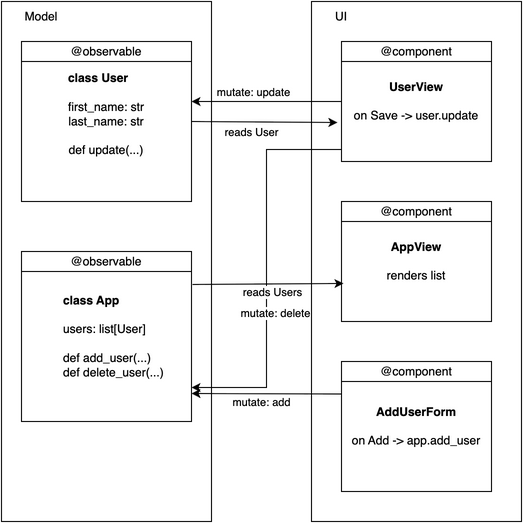
The state lives in instances of two @ft.observable classes: User (first_name, last_name) and App (users: list[User]). @ft.component functions read that state and return controls — UserView renders one row, read-only or editing; AddUserForm renders the add form. Each row's "editing" flag and input buffers are local ft.use_state hooks: they're view-only and don't belong on User.
- Add (in
AddUserForm) callsadd_user_and_clear(), which callsapp.add_user(...)— appending aUsertoapp.users— then clears its own localuse_statebuffers.AppViewholdsappviause_state, so this re-rendersAppView, regenerating the whole user list. - Edit calls
start_edit(), which resets the local buffer hooks to the user's current values and callsset_is_editing(True)— re-rendering just that row'sUserViewinto its editing form. - Save calls
save(), which callsuser.update(...)andset_is_editing(False)—userwas passed directly into thisUserView, so only this one row re-renders with the new values. - Cancel calls
cancel(), which callsset_is_editing(False)— re-rendering that row back to read-only without touchinguser. - Delete calls
app.delete_user(user), removing it fromapp.users— like Add, this re-renders all ofAppView, not just the one row.
from dataclasses import dataclass, field

import flet as ft


@ft.observable
@dataclass
class User:
    first_name: str
    last_name: str

    def update(self, first_name: str, last_name: str):
        self.first_name = first_name
        self.last_name = last_name


@ft.observable
@dataclass
class App:
    users: list[User] = field(default_factory=list)

    def add_user(self, first_name: str, last_name: str):
        if first_name.strip() or last_name.strip():
            self.users.append(User(first_name, last_name))

    def delete_user(self, user: User):
        self.users.remove(user)


@ft.component
def UserView(user: User, delete_user) -> ft.Control:
    # Local (transient) editing state—NOT in User
    is_editing, set_is_editing = ft.use_state(False)
    new_first_name, set_new_first_name = ft.use_state(user.first_name)
    new_last_name, set_new_last_name = ft.use_state(user.last_name)

    def start_edit():
        set_new_first_name(user.first_name)
        set_new_last_name(user.last_name)
        set_is_editing(True)

    def save():
        user.update(new_first_name, new_last_name)
        set_is_editing(False)

    def cancel():
        set_is_editing(False)

    if not is_editing:
        return ft.Row(
            [
                ft.Text(f"{user.first_name} {user.last_name}"),
                ft.Button("Edit", on_click=start_edit),
                ft.Button("Delete", on_click=lambda: delete_user(user)),
            ]
        )

    return ft.Row(
        [
            ft.TextField(
                label="First Name",
                value=new_first_name,
                on_change=lambda e: set_new_first_name(e.control.value),
                width=180,
            ),
            ft.TextField(
                label="Last Name",
                value=new_last_name,
                on_change=lambda e: set_new_last_name(e.control.value),
                width=180,
            ),
            ft.Button("Save", on_click=save),
            ft.Button("Cancel", on_click=cancel),
        ]
    )


@ft.component
def AddUserForm(add_user) -> ft.Control:
    # Uses local buffers; calls parent action on Add
    new_first_name, set_new_first_name = ft.use_state("")
    new_last_name, set_new_last_name = ft.use_state("")

    def add_user_and_clear():
        add_user(new_first_name, new_last_name)
        set_new_first_name("")
        set_new_last_name("")

    return ft.Row(
        controls=[
            ft.TextField(
                label="First Name",
                width=200,
                value=new_first_name,
                on_change=lambda e: set_new_first_name(e.control.value),
            ),
            ft.TextField(
                label="Last Name",
                width=200,
                value=new_last_name,
                on_change=lambda e: set_new_last_name(e.control.value),
            ),
            ft.Button("Add", on_click=add_user_and_clear),
        ]
    )


@ft.component
def AppView() -> list[ft.Control]:
    app, _ = ft.use_state(
        App(
            users=[
                User("John", "Doe"),
                User("Jane", "Doe"),
                User("Foo", "Bar"),
            ]
        )
    )

    return [
        AddUserForm(app.add_user),
        *[UserView(user, app.delete_user) for user in app.users],
    ]


def main(page: ft.Page):
    page.render(AppView)


if __name__ == "__main__":
    ft.run(main)
Conclusion
Imperative and declarative aren't just two ways to write the same code — they're two different ways to think about UI. Imperative asks "what should change on screen right now?" — you list, step by step, exactly what to change for each interaction. Declarative asks "what does my data look like right now?" — you describe the UI as a function of that data, and let Flet figure out what changed on screen.
That shift pays off most as an app gets more interactive:
- Debugging — since the UI is derived from state, a bug is either "the state is wrong" or "the render is wrong," not "some event handler forgot to update a flag." You can inspect the state directly instead of tracing through a chain of mutations.
- Testing —
app.add_user(...)anduser.update(...)are just regular Python methods with no Flet controls involved. You can call them directly in a test and check the result, with no page or rendering required. - Multiple views of the same data — if two parts of the UI need to reflect the same state (a badge count, a list, a chart), each just reads from that state instead of being kept in sync by hand.
- Complex, multi-step UIs — wizards, filters, undo/redo — where many pieces of UI depend on overlapping state, declarative code scales by adding more state and components, not more handler-to-handler coordination.
For more declarative examples, see the declarative examples collection — including a Counter, a To-Do app, and games like Tic-Tac-Toe and Minesweeper. You can also try them interactively in the Flet Studio.